Church technology: 10 tools worth using
Not every church needs big equipment. Here are 10 church technology tools that are affordable, realistic and easy for volunteers to run.

Using church technology is only worth it if it frees you and your team up for the things that matter - time and connection with people. If it doesn't do that, then don't bother.
So that rules out a lot of expensive gear. What remains is a very short list of things most churches can put to work this month, and much of it is free.
Ten tools below, complete with practical tips for how to use them and where to begin. Towards the bottom is a list of what can wait, because no church needs everything yesterday.
A final word before we begin. Technology will not add new people to your church or fix a worn-out team. That's the job of people. Technology just alleviates some of the paperwork.
What makes church technology worth using?
A tool is worth using if it passes three checks:
-
Your church will be able to pay for it without reducing your ministry.
-
It may be operated by a volunteer without any special training.
-
It solves a problem you have today.
If it does not pass even one of these, think about whether it can be delayed.
Church technology solutions are often sold as a big bundle. You don't usually need the big bundle. You need the one item that solves this month's problem.
Looking for tips on how to introduce a new piece of equipment to your team? Check out our article on 9 steps to adopt new technology in church.
Tool 1: Church management software
House all your member information, check-ins, and groups in one place, so you're no longer going through notebooks, cell phones, or ancient spreadsheets to find details.
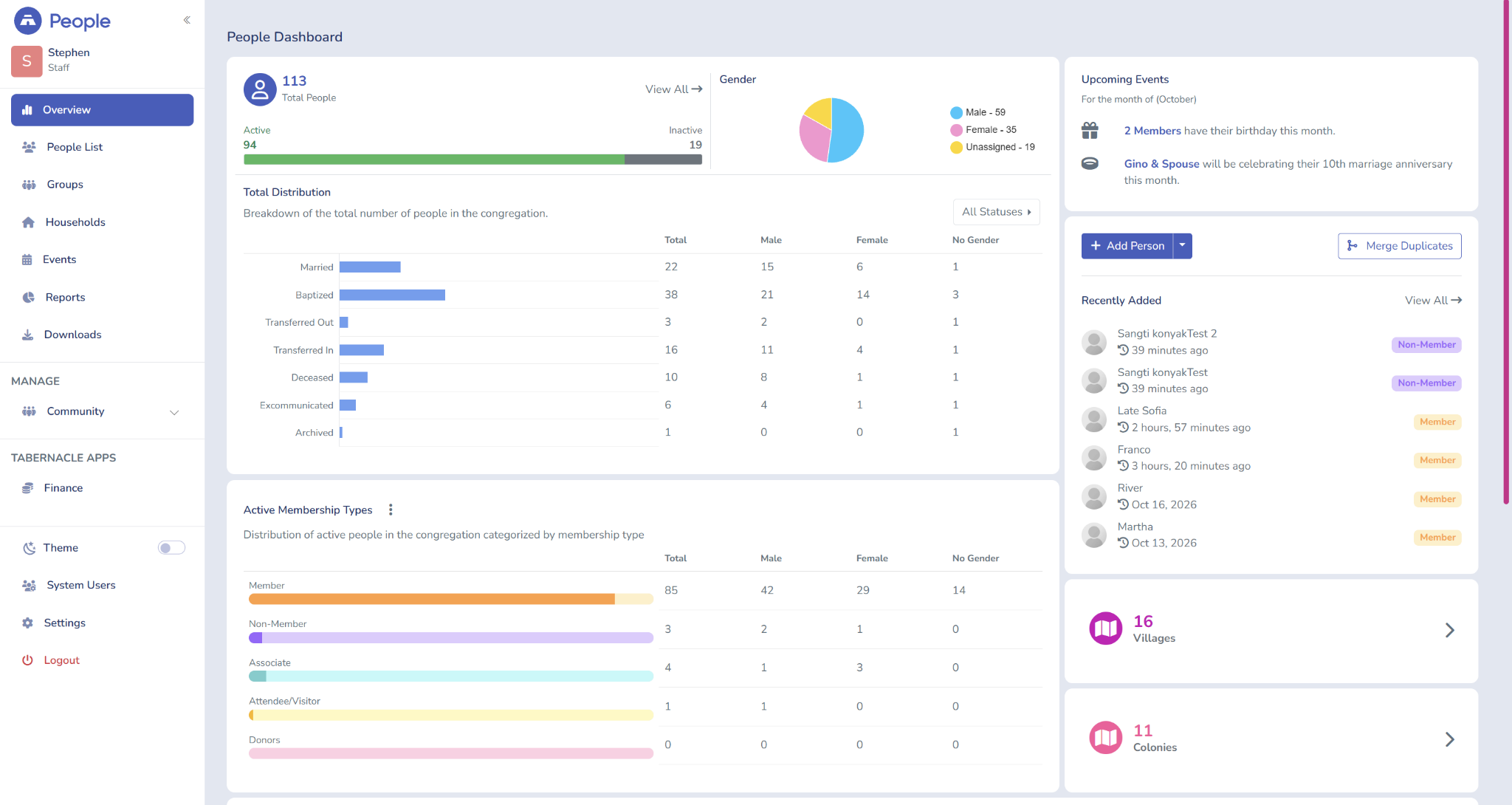
Here's a simple test. A member's family is coming to the hospital tomorrow. Can your group find that members' phone number, group, and last attendance in under one minute? Or does your data let you down, no matter how well you try to treat it?
Good church management software should cover:
-
Member profiles and families
-
Attendance
-
Groups and ministries
-
Giving and finance records, preferably in one place
Tabernacle is one such platform. Your team can hop between the members' side and the finance side since it's one comprehensive platform.
No software will ever turn a church that doesn't have attendance records into a church that does, so begin small. One month of names, phone numbers, and attendance.
Cost: low to paid, depending on the size of your church. You can find out more in our church management software guide.
Tool 2: WhatsApp groups and broadcast lists
It's free, and most of your people already use WhatsApp. It works when you just set a few simple rules.
-
One team. One purpose. Youth, choir, prayer, announcements.
-
Only admins should be able to post in the announcements group.
-
Have a minimum of two admins in each group so that it doesn't go quiet if one admin leaves or has their account compromised.
-
Choose a broadcast list if you want one notice to be sent to individuals privately. Recipients usually have to store your number in their phone to receive broadcasts; WhatsApp describes how to create a broadcast list in its guide to broadcast lists.
This week's tip: Create a spreadsheet of all the church groups and admin, and copy and paste to remove duplicates.
Cost: Free.
Tool 3: Google Forms
Google Forms is used as an alternative to paper slips at the visitor's card, event registration, and prayer requests. They can also collate responses in one location.
The visitor form only contains a few fields:
-
Name and phone number
-
How they heard about the church
-
A question of yes or no: is it okay to contact you?
Create a QR code to link to the form and post on a notice board, banner, or backs of seats. Link to Google Sheets so Monday follow-up becomes a quick list rather than a heap of slips.
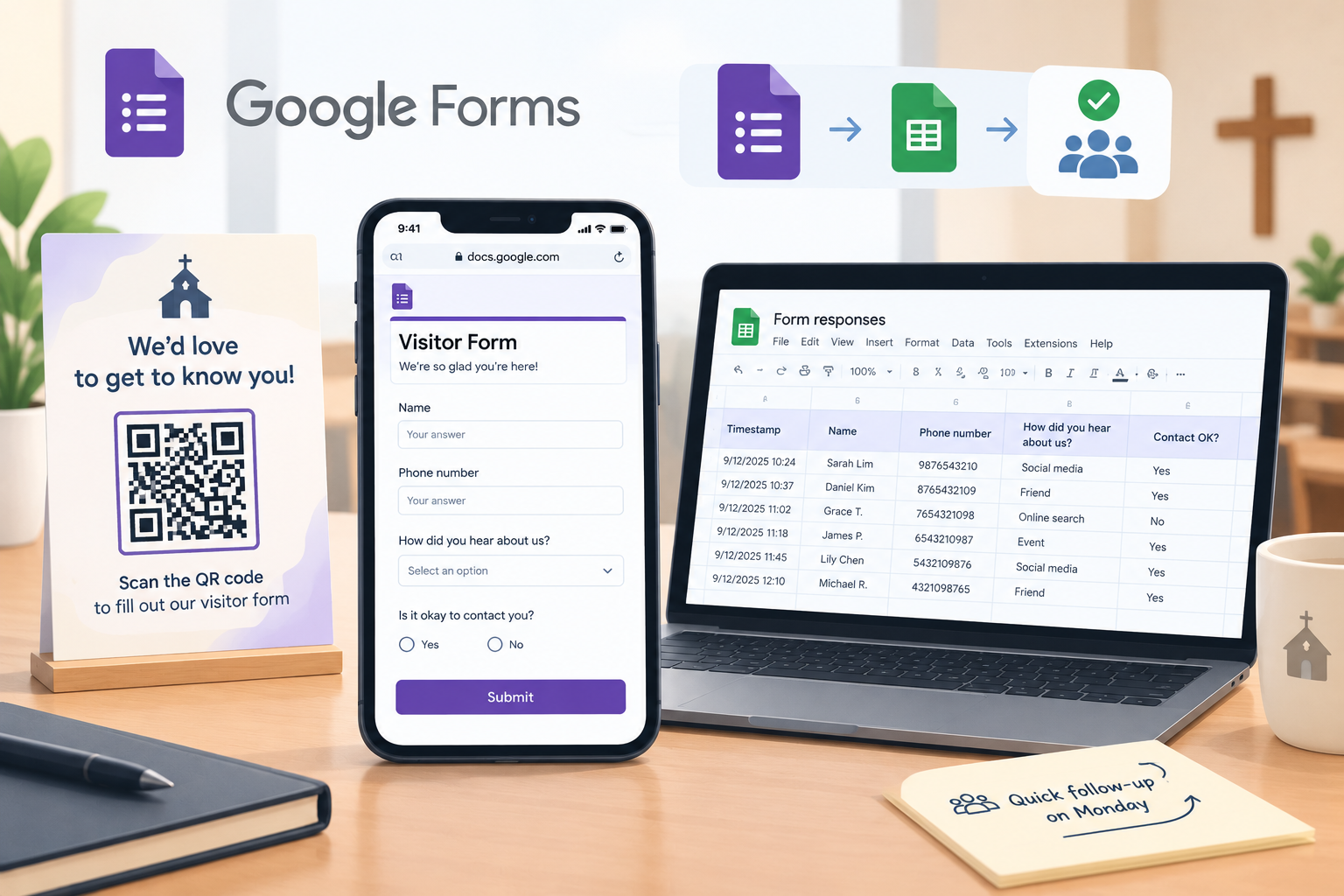
Prayer requests are different. Provide this response sheet to as few people as possible. Let people know who will have access to the requests, and gather only the information you need.
This week's experiment: Create a visitor form in one sitting and try it out on your personal phone. The guide to using Google Forms explains how to get started.
Price: Free using a personal Google account; some additional features may require a paid Google Workspace account.
Launch your church into the future
Everything your ministry needs — giving, events, members, and more. Try it free, no credit card required.
Start Free Trial No credit card • Cancel anytimeTool 4: Shared calendar and volunteer roster
One calendar for your church, so everybody knows what's happening and where, and who's on duty.
-
Select one calendar and one owner who approves new requests.
-
Add services, events, and room bookings, so two groups do not book the same hall.
-
Mainly keep the roster in a common sheet with Sundays down the side and roles as the headings across.
-
Grant ministry leaders edit privileges for the calendar and the roster, and view access for other team members whenever necessary.
That one rules out fights. If only the leaders can make changes, no one has their name silently modified.
Try this week: Fill in the next eight Sundays.
Cost:Free with personal Google accounts; most additional capabilities are available with a paid Google Workspace subscription.
Tool 5: Simple digital giving options
Digital giving allows members to give from their mobile device. Keep the options minimal and record all gifts on time.
Start with the basics:
-
Your church bank account or local payment app's QR code.
-
Bank transfer details in the bulletin and on the screen.
-
Get a payment link that is shareable on WhatsApp.
A church donation platform. FaithPay, Tabernacle’s platform for churches in India, is one example. Members give by UPI or card through its mobile app, and the church can review each donation.
Some cash and checks are in the offering box; you have three transfers in the bank app, and two other gifts arrived without the sender's name. The online tool has done its part. The next task is to assign someone to attribute those gifts to an individual or designated fund. Delegate that responsibility to a single person, and encourage them to record and reconcile the gifts as soon as feasible.
Two more rules - whatever option you choose. Know what fees they charge, and never post who contributed what in group chat.
Read more about maintaining transparency in the records of donations at 6 ways technology can improve transparency.
Cost: free to low for basics. Know the bottom line before getting on a platform.
Tool 6: Church accounting tools
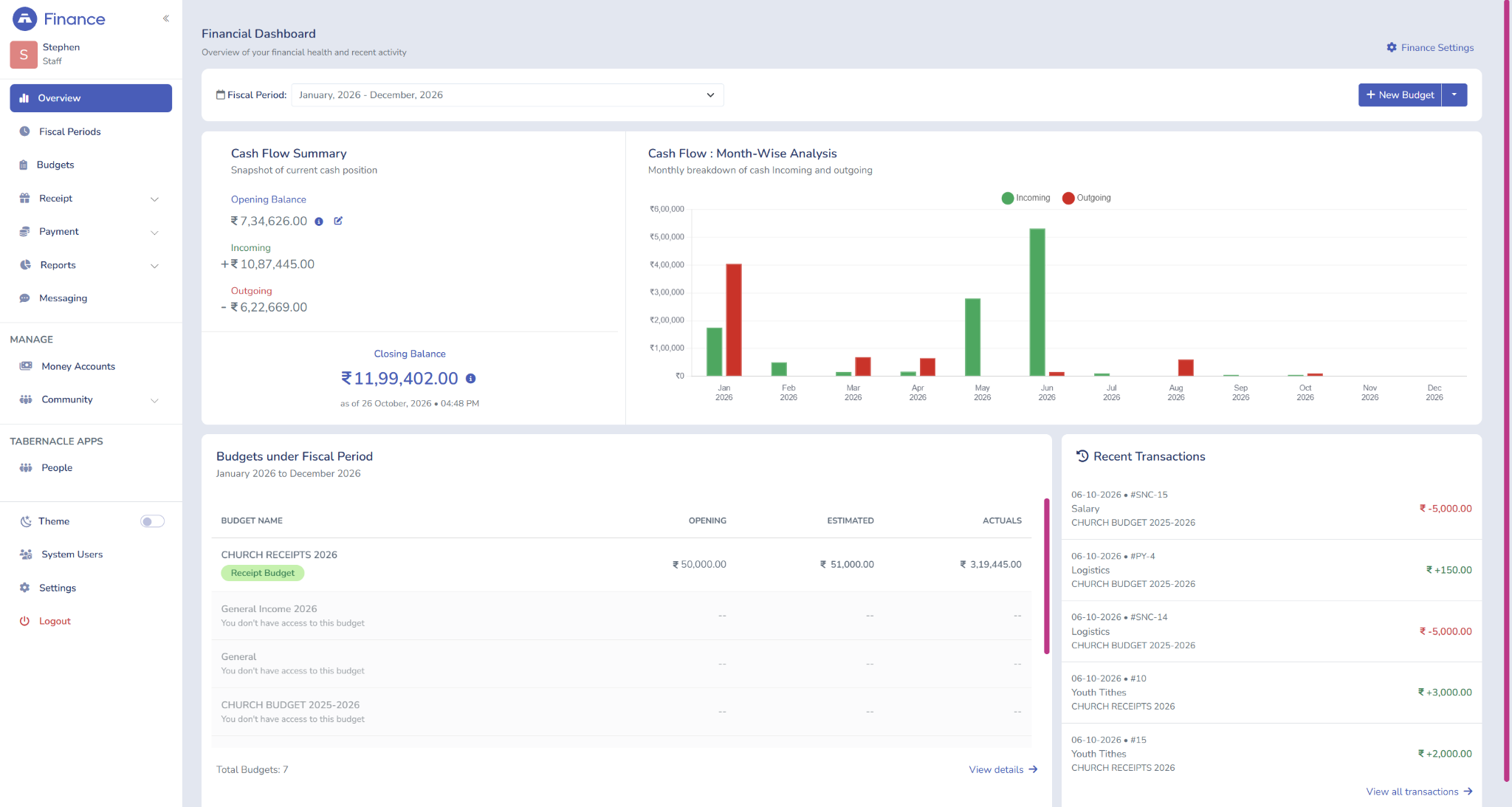
Church accounting tools record income and expenses – so your treasurer can give church leaders a financial report.
When you only have one bank account, just a couple of funds and a single person entering the numbers, if the entries are correct, recorded, backed up, and comprehensible to a third party, a spreadsheet is enough.
Transition to accounting software when:
-
Several ministries need their own budgets.
-
Multiple people enter figures and record keeping becomes difficult to keep consistent.
-
The time from receipt of the book to completion of the weekly report takes well over an hour thanks to the manual calculations involved and duplicated effort.
-
One asks for one, and the other for two, and you cannot bring the two together.
If you already use Tabernacle for your members, you can track your members' information and church finances in one place. Our church accounting software guide looks at the whole story, and the church financial reporting post looks at what your leaders need to monitor on a monthly basis.
Tool 7: Phone-based live streaming and sermon recording
No need for an expensive camera, only a phone on a tripod and a free platform to stream the service or record the message.
Spend in this order:
-
A tripod, or a steady shelf
-
Near speaker with a microphone or recorder
-
A stable internet connection, tested before Sunday
Sound is first, and video is second. We tolerate a blank picture much longer than a quiet sound.
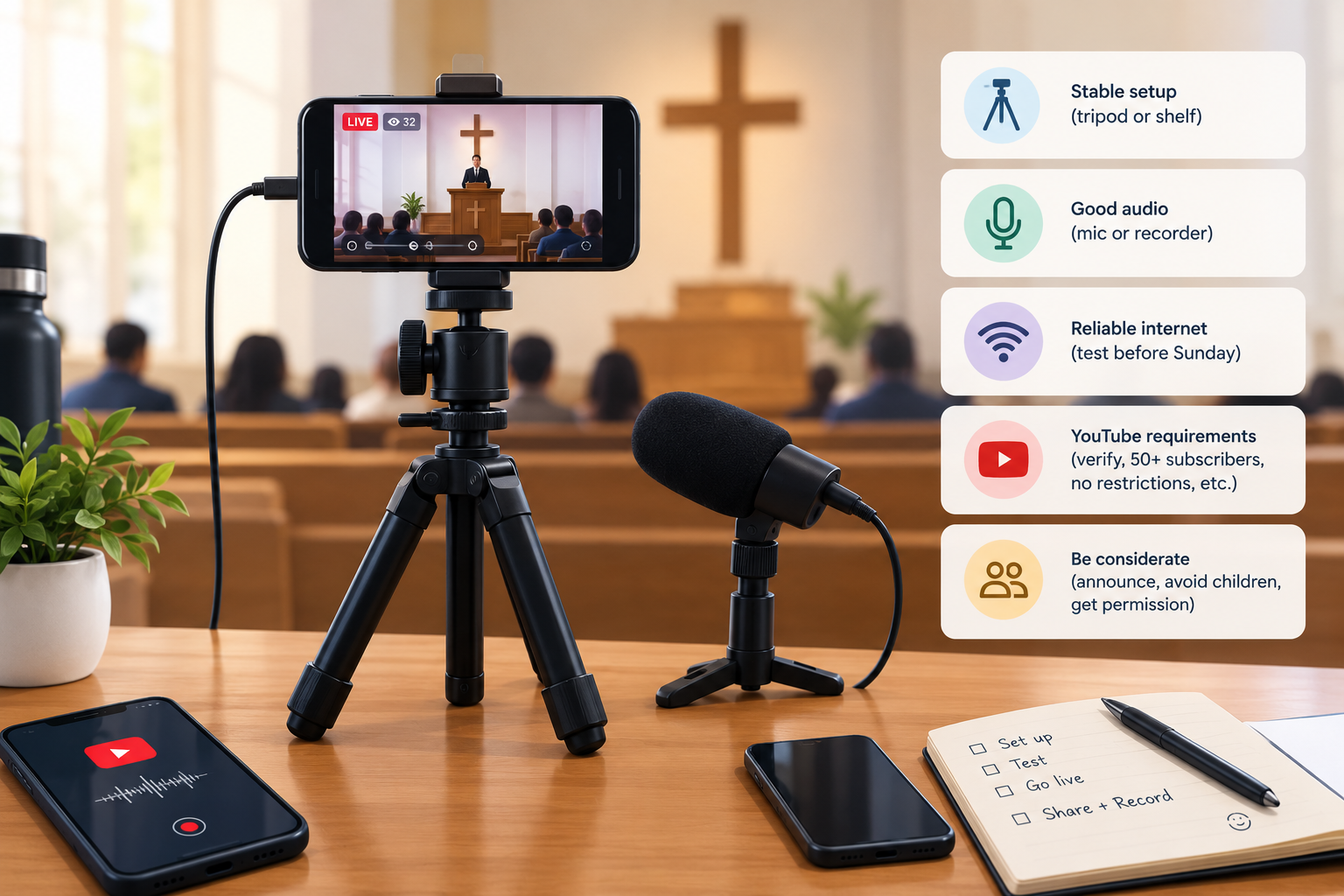
Prepare your platform before the first Sunday. You will need to verify your channel to be able to go live on YouTube, so make sure you do that before the first Sunday. It might also take YouTube up to 24 hours to activate your channel for the first time you want to go live. To go live from your device, YouTube also needs a minimum of 50 subscribers, verified channels, a device that supports streaming, and no restrictions on live-streaming in the past 90 days. Read YouTube's live-streaming guide to learn all the available requirements.
Two small acts of kindness: share with your church that you will be streaming and avoid pointing the camera near the children's section. Seek permission to record/stream identifiable congregation members, and parental/guardian permission before sharing footage of children.
And record the sermon audio also. Send it on WhatsApp for those who are sick or away, and for those who are working shifts.
Cost: Free - inexpensive, depending on the equipment you own and what you require to purchase.
Tool 8: Free worship presentation software
Free presentation software is all that is needed to display the lyrics, Scripture, and announcements.
Google Slides and PowerPoint for the web both work. OpenLP is a free and open-source presentation software targeted specifically for worship presentations.
It is the habit that is important:
-
Maintain a Master File using the default background and font size.
-
Copy it every Sunday; don't begin a brand new one.
-
Store songs in one shared folder.
-
View the size of the text from the last row.
Paid presentation suites can be deferred. Gone are the days when most churches want presentation software and not the additional bells and whistles. Use free software as enough for what you want to do, but your church may require the right kit and someone to prepare the slides.
Price: Free software, costs of equipment if needed.
Tool 9: Church website and Google Business Profile
Take advantage of a simple website and Google Business Profile so people can discover your hours of operation and location before they walk through your door.
One page is enough to start. Put these on it:
-
Service times
-
Give a Location With a map
-
What a first visit looks like
-
A phone number or WhatsApp contact
Next, create a Google Business Profile using the same information and some images. You must verify it, which takes some time, so you can have full control over your profile. Here's how Google guides you through creating your Business Profile.
But the most important rule is to make the times and the address identical everywhere. A stranger seeing two different service times on two pages may simply never go.
Update both after any change, such as a holiday schedule.
Google Business Profile is free; the range of free to paid for websites depends on which website platform you choose and the hosting for it.
Tool 10: Backup and basic security
Backup and security tools safeguard your finance and member information against lost phones, broken laptops, and managing passwords for multiple accounts.
They're on a piece of paper with phone numbers, addresses, revealing information, and prayer requests. They gave them to you.
Begin with these:
-
Store records in cloud storage or in your church software. Do not keep records on a single laptop. Make a backup and store some away from your church, and check you can restore them.
-
Enable two-factor authentication for the church email and social media accounts along with the accounting system.
-
Don't ever give your password in a group chat.
-
Authorize access on a need-to-know basis. The youth leader doesn't need the finance books.
-
If a volunteer leaves, delete their access and change any passwords that they shared with others.
Give this a go this week: Write down all of the accounts your church has, and who has access to each. You may discover one you have never known about.
Originals that still exist on paper: go to digitising church records.
Cost: free to low.
Where should a church start?
Begin with the most time-consuming problem and add one tool at a time. Things that commonly cause your technology ideas not to progress are: not being owned by anyone, so assign each piece of technology to someone.
|
Church type |
Start with |
Add next |
|
Small church |
WhatsApp groups, Google Forms, shared roster |
cBackup and security then if it's necessary digital giving |
|
Growing church |
Church management software, shared calendar, digital giving |
Accounting tools, streaming on phone |
|
Church with several ministries |
Church management software accounting tools backup and security |
Website and Google Business Profile, phone streaming |
These are merely suggestions. The number of church members is just an indicator. Your biggest headache, and the money you have to spend and number of workers will determine which is the highest priority.
What church technology can wait?
Skip costly gear until you know the basics work. There are several bits of gear listed below that you can skip until you know you'll need them and someone else is available to operate it.
-
Multi-camera video. As long as you only have one good microphone, that will be sufficient until you get some more bodies to work multiple angles.
-
Ensure that audio volumes are audible and that the projection screen can be read.
-
Door and camera security systems. Identify the safety risks in your church and get some recommendations and a budget before making a purchase.
-
Mailing systems and postage machines. Only applicable if you send out statements en masse.
-
Paid presentation packages. Free tools get you there.
Before you buy anything, make sure you ask yourself:
-
What problem will this solve next month?
-
Who will run it every week?
-
What if that person walks out?
-
If you cannot answer all three, wait.
Frequently Asked Question
What church technology do small churches need first?
Begin with an easy way to communicate and to gather and store visitor data. WhatsApp and Google Forms are all you need. Grow with the other tools as your needs develop.
What is the most affordable way to get started with church technology?
Use free tools like WhatsApp, Google Forms, Google Calendar, Google Sheets, and the phone you've already got. Remember that this will take time to set up, costs for devices, and staff to service them.
Is church management software really necessary?
Not necessarily. A small church can get by with forms and spreadsheets. You'll see the most benefit from church management software if you've got data in multiple platforms, multiple staff with access, or a lot of manual work.
Is it safe to store church member data online?
Yes - if you have the right security controls in place. Make sure you turn on two-step verification, restrict access to only the people who need it, and take away access when your volunteers leave.
Ready to transform your ministry?
Join hundreds of churches using Tabernacle — free for 14 days.
Tabernacle Partner Awards 2026
The Tabernacle Partner Awards 2026 recognizes seven churches who stood out for the thoughtful and innovative ways they’…
How to increase church attendance: 10 ideas
Ten practical ways to bring people back and keep them, built on your own attendance records and honest conversations.
Church financial reporting: what to review monthly
What should church leaders review each month? Five key numbers, a sample report with three problems, and a ten-minute w…
