
Church data security: protect member records
Member lists in spreadsheets, WhatsApp groups and old registers can expose private details. Here are 7 common leaks and how to fix each one.
Ever wondered how many of your church's members list lives right now
The spreadsheet is on the secretary's computer. Someone has emailed the copy to their group leader. The group's phone numbers are saved in a WhatsApp group. The register is kept in the filing cabinet in the office. Perhaps someone took a photo of it on their phone when they last used it.
Most churches, in fact, could locate their member information in five or six places with absolutely no effort at all. Now, the upside of that is that the more copies of that information you've got floating around, the more places that private information can get out.
Church data security is mostly about those copies . Keep reading for 7 of the most common ways your records will leak, and how to fix each one, plus a chart of who should see what, a leaving checklist for volunteers or treasurers and a quick 30 min check you can do this week.
What Is Church Data Security?
Church data security is the practice of keeping the personal information of your members safe from being viewed, modified, lost, or shared by someone who shouldn't see it. Not just the apps, phones, and paper records you keep your data in but the behaviors of those who are accessing them.
Have a look: list member records are more than merely names and numbers. Your church likely contains a great deal of sensitive information, for instance:
-
Phone numbers, addresses, and family details
-
Birthdays, baptism, and membership dates
-
Giving and offering records
-
Pastoral notes and prayer needs
-
Children's names and their parents' contacts
Some of this may seem ordinary, but some is very intimate. Can you imagine how you'd feel if someone else is reading through the prayer requests you submitted, or your tracking donations? Yeah, trust is pretty much broken.
But oh, there's more about data loss. Imagine if your laptop died and the only copy of the register goes with it. Well, that's data loss sorted for you, and another reason why backups are a good idea.
Where do church member records usually leak?
Have you ever found church member records in places they shouldn't be? It's probably due to common, uncontrolled practices. Here's the reality: the tools below are not bad. The problem is in sharing the records and granting access to those who should not have it.
Now, here are several scenarios to begin with: Each one will give you an image of a leak, and you've likely heard of them all - and you're going to get a simple solution for each.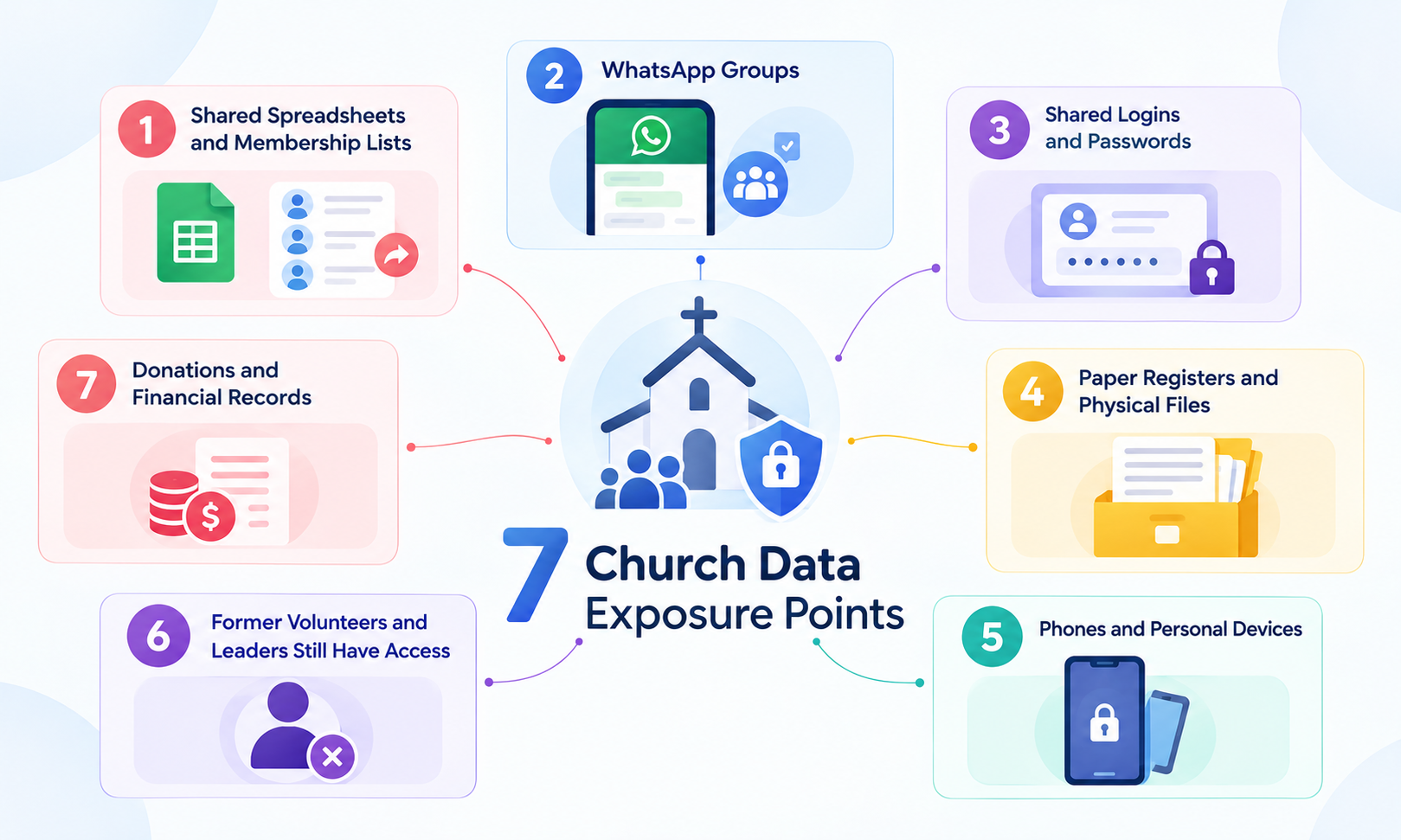
Launch your church into the future
Everything your ministry needs — giving, events, members, and more. Try it free, no credit card required.
Start Free Trial No credit card • Cancel anytime1. Shared spreadsheets and membership lists
Spreadsheets are great. The issues start when that list gets sent to everyone and their uncle. Say the church secretary emails the entire membership list to the youth leader who only needs the youth group contacts. Six months down the line, that list is still sitting in the leader's inbox, in their phone and even on a family computer shared with their siblings. Who could possibly keep count of how many copies are floating around?
The fix:
-
Maintained one copy in one location and had someone to keep control of it.
-
Share only the info someone really needs - for example, specific group contacts.
-
Where possible, consider providing a limited link rather than the file, so you can revoke or restrict access when needed.
2. WhatsApp Groups
Is your church on WhatsApp? You're not the only one. Many churches are on WhatsApp. But there is one thing that can land you in trouble, and that is what can be sent over these groups. Suppose a pastor or church leader shares a prayer point that exposes the church and a family's privacy to hundreds of members of the church group.
The fix:
-
Have a different group for different purposes, like as youth, events update and choir
-
Do not include sensitive information or prayer requests in these group messages.
-
Keep admin numbers low and be sure to audit Admin access.
3. Shared Logins and Passwords
Another thing you might not realize is how helpless you are if your secretary, treasurer, and a handful of volunteers all use the same login. You don't have a way to tell who entered or changed information. And if you want to get rid of one person, it means changing the password for everyone. Think about a login that gets used for years, never knowing who still has it.
The fix:
-
Give a personal account for each person.
-
If you have to use shared login for the time being, restrict its use, track everyone who has the login details, and - for those who are no longer needed - set up their own accounts as soon as you can. Change the password when a user leaving is no longer relevant.
4. Paper Registers and Physical Files
Can you picture it: the forms lying out in an unlocked cupboard in the church office, not far from the offering envelopes. Anyone who got the office key-or any one walking into the office that day-had access to the forms.
The fix:
-
Keep them in a safe and secure place, such as a drawer or cupboard, and assign two people who you trust the most with extra keys
-
Have documents which are of no use anymore ? Properly destroy them instead of simply throwing them in the bin
-
And if you're thinking of switching to a digital system, be sure to have a look at our article about digitizing church records. Just be sure to file or securely dispose of the paper copies.
5. Phones and Personal Devices
Now think about this: you have a volunteer who downloads the member list to send out reminders. Then a few weeks later, the phone is stolen or someone else is using it to play games.
The fix:
-
Use a strong screen lock and update your phone.
-
Avoid downloading lists or taking pictures of registers whenever possible.
-
Keep any important documents or precious pictures in an approved storage location - a shared church location that restricts access, rather than in your phone's gallery or downloads folder.
-
Do clear out any dashed copies of your work after you've completed the task.
6. Former Volunteers and Leaders Still Have Access
The treasurer two years ago still has the finance spreadsheet in their email and is still in the leaders' group chat. Because nobody took the time to delete him. Just got lost in the shuffle.
The fix:
-
Every once in a while, you should go back and see who has access, say at least twice a year.
-
And don't stop with that. Every time when some change a role or decide to leave the team, conduct a review again
-
Ensure that you revoke access when it's no longer required and transfer any records or duties to an appropriate person.
Use a step-by-step checklist for this further down.
7. Donations and Financial Records
Now consider another volunteer who helps to record the contribution but is also able to look at the files that reveal how much each family contributes. Was that by design? No! (That's the same folder with everything else in it.)
The fix:
-
Cut off access to the giving records for anyone on the finance team, including the treasurer, who don't need access to it.
-
Separate donations information from the overall contact list of the member.
-
Give numbers not names-unless those identifying the latter are essential and appropriately approved-when publishing to the broader church.
See how a church software accounting helps in keeping all your financial data in one place.
So who exactly should see what? Fixing leaks one by one works, but one rule sits underneath all seven.
Who should see what in your church?

Give each person the access their role needs, not access to everything by default.
Most of the leaks above come from the opposite habit. It usually starts with trust, which is why it is hard to spot. The table below is a starting point for your access permissions. Every church has different roles, so change it to fit yours.
|
Role |
Member contacts |
Giving records |
Pastoral notes |
Children’s information |
| Role
Pastor |
Member contacts
Yes, as needed |
Giving records
Only if the church has authorized it |
Pastoral notes
Yes, for people they care for |
Children’s information
Where the role needs it |
| Role
Secretary or admin |
Member contacts
Yes |
Giving records
Usually no |
Pastoral notes
No |
Children’s information
Where the role needs it |
| Role
Treasurer |
Member contacts
Only what the duties need |
Giving records
Yes |
Pastoral notes
No |
Children’s information
No |
| Role
Group leader |
Member contacts
Own group only |
Giving records
No |
Pastoral notes
No |
Children’s information
Own group, if authorized |
| Role
Volunteer |
Member contacts
Only what the task needs, for as long as the task lasts |
Giving records
No |
Pastoral notes
No |
Children’s information
Only in children’s ministry, if authorized |
| Role
Children’s ministry leader |
Member contacts
Parents’ contacts for their class |
Giving records
No |
Pastoral notes
No |
Children’s information
Yes, for their class |
This is a template, not a rule. Your church’s safeguarding policy, constitution and local law may ask for something different. When a role needs access, give it for the task and take it back when the task ends.
If you use church software, look for settings that control what each person can open. Tabernacle’s Admin section is built for delegating tasks and controlling access for your team.
What should you do when a volunteer, treasurer or leader leaves?

Image 3 (leaver checklist): Checklist for removing a departing volunteer’s access to accounts, devices, folders, keys and cloud storage
It's a few weeks down the road after someone left your business and then you learn that they still have access to company data. Bad news? When someone leaves and burns bridges, you've got to be quick. Remove access immediately, or at least on their final day.
Follow this checklist:
1. Check and then list all the access the person has: accounts, group chats, any device, any keys, printed list and shared folders
2. Delete or suspend their accounts and permissions.
3. Change any shared passwords they knew.
4. Removed them from share drives and delete their admin capabilities in group conversations.
5. Gather all church devices, keys, registers, and printed lists.
6. Hand over their records and responsibilities to the named successor. Request that they delete all other church records from their personal device, but only after the transfer has been confirmed and the records are safely transferred.
7. Finally, note the date, changes and who checked it.
Point 6 is important here. Telling a colleague to delete records before the handover and you could lose the only copy.
Which basic habits keep church data safe?
Concerned about safeguarding your church's data? You're not the only one, and thankfully you don't need to be a techie! Just five practices address the majority of day-to-day threats.
-
Great, unique passwords. I know this has been said a dozen times, but it's worth repeating: Use a long, unique password for every account. Luckily, a password manager can help with this.
-
Two-factor authentication. Do you have it enabled for your church email and platforms with info on members or financial documents? It's crucial because password leaks, regardless, are no longer enough to break in. CISA offers a walkthrough for turning on MFA.
-
Consider backups. Do you have data stored in two different locations, including one off-site? Do you regularly test your ability to restore the data? CISA's backup guide recommends maintaining three copies, two different storage types, one of which is off-site.
-
Updates. Never delay installing security updates on your phones and computers.
-
Watch out for unusual messages. Has someone ever sent you a message requesting a list of members or an immediate payment? It might look like it is from the pastor, but check the request by another trusted communication channel before providing details or money.
Can church management software help?
Is church management software really necessary? No, not every church. If you're in a small, single-administrator church with a small congregation, a nice, tidy spreadsheet might do the trick.
|
Approach |
Works well when |
Watch out for |
| Approach
Spreadsheets and shared folders |
Works well when
Your needs are straightforward, and only small numbers use the records |
Watch out for
Copies went around, and permissions were difficult to monitor |
| Approach
Church management software |
Works well when
There are multiple individuals who need ordered members and finance data. |
Watch out for
Setup, training and someone to manage permissions |
Trying to compare different software? Look for this features:
-
Account per user
-
Role Base permissions
-
Consider access controls. Member and finance records separate?
-
A simple backup and easy recovery process
-
Information on how the provider handles your data
-
Helps in moving your existing records across
-
Ability to export them when you leave.
Here is one example to look at: Tabernacle. It houses your financial and membership records all in one, accessible anywhere, and its Admin page means you're in charge of what your team can do. If your records are all on paper, Excel or even another church management system, the Tabernacle team will assist you with the transition - whenever you need it! For more ideas, see our article, Church technology: 10 tools you should be using.
A Software does not make records safe on its own. Someone still has to set permissions, protect accounts and review access.
How can you check your church’s data security in 30 minutes?
Are you prepared to answer some critical questions with your team? Take a seat with a peer to discuss these eight must-ask questions. And don't stress-you won't require technical expertise to begin.
-
Do you know where all of the member records are stored, including those for phones and paper?
-
Does everyone who views or uses church records have a login?
-
Are giving and pastoral records limited to only those who are needy?
-
Are the church emails and systems where records are maintained have two-step verification turned on?
-
How about backups, have you got one, and has anyone actually tried restoring from it?
-
Everyone who has quit a position and who no longer requires it be barred?
-
Is member listing the only time they are shared, if really needed?
-
Is anyone aware of the protocol to follow in case a phone is lost or records are stolen?
What do your answers mean?
All Yes: Awesome! Book another review in half a year.
No: Write it and pass it onto someone with a due date.
Three or no: Begin with access first, then accounts, then backups.
Frequently Asked Question
1. Who should have access to church member records?
Just those who must see this information to do their job, and only the information they need! Regularly check permissions and revoke access when it's no longer needed.
2. Can church records be stored in the cloud?
it depends on the provider and the specific options you are enabled for. Use logins for the entire staff, activate two-step authentication, and verify the provider protects your data.
3. What should a church do if member information is exposed?
Shut down access, protect the targeted accounts, report the breach, and determine the records impacted. Don't forget to inform church leadership and report where you're required by law.
4. Would my small church need church management software?
Records can be secured through having us do their own account, preventing public access, and backing up. However, when spreadsheets aren't cutting it, software is the way to go.
Ready to transform your ministry?
Join hundreds of churches using Tabernacle — free for 14 days.

Introducing Member ID in Tabernacle
Tabernacle now has a Member ID. Add it to new members or in bulk, download it, and search for anyone by their Member ID.

Tabernacle Partner Awards 2026
The Tabernacle Partner Awards 2026 recognizes seven churches who stood out for the thoughtful and innovative ways they’…

Church technology: 10 tools worth using
Not every church needs big equipment. Here are 10 church technology tools that are affordable, realistic and easy for v…
